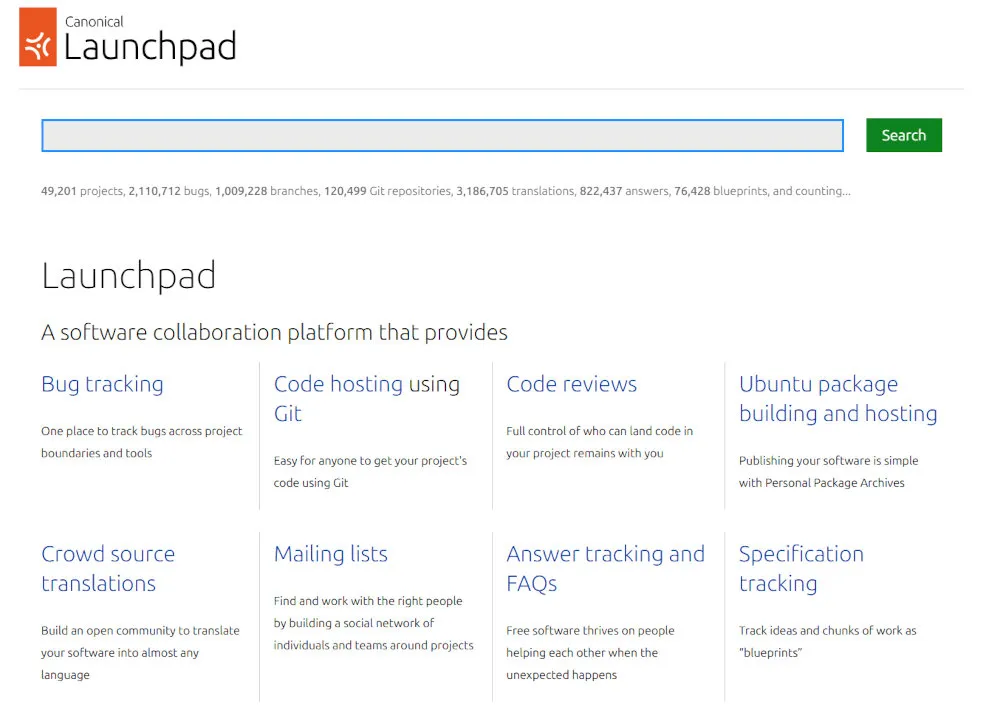
Launchpad: Canonical's Software Collaboration Platform for Ubuntu and Beyond
Table of Contents
- Introduction
- Key Features at a Glance
- The Launchpad Philosophy: Who Is It For?
- GitHub vs. Launchpad: A Quick Comparison
- Understanding PPAs and the Build System
- Bug Tracking Across Distributions
- Getting Started with Launchpad
- Pros and Cons
- Frequently Asked Questions (FAQ)
- Conclusion
- Getting Started & Further Reading
Introduction
Most platforms in this series compete for the same job: hosting your Git repository and running your CI/CD pipeline. Launchpad doesn’t really compete on that ground at all. Canonical launched the site in 2004 and opened it more broadly in 2005, for a single, specific purpose: to coordinate the development of Ubuntu, and by extension, the wider world of Debian-based Linux packaging.
That purpose still defines it today. Launchpad bundles code hosting, cross-project bug tracking, translations, and, most distinctively, a full package-building service that turns source code into installable .deb packages and hosts them in your own software repository. It’s also the platform Canonical uses internally to publish and manage the official Ubuntu archive itself, which is a large part of why it’s considered “plumbing” rather than an optional tool. If you’ve ever run sudo add-apt-repository ppa:something/something on Ubuntu, you’ve already used Launchpad without necessarily knowing it.
It is free to use, run entirely by Canonical, and has quietly powered the Ubuntu ecosystem for two decades. For general-purpose software teams, it’s a poor fit. For anyone packaging software for Ubuntu or Debian, it’s close to unavoidable.
Note: Launchpad originally supported two version control systems: Git and Bazaar, Canonical’s own earlier distributed VCS. Bazaar code hosting has since been discontinued, and Git is now the only actively supported option. Every section below reflects that current, Git-only state.
Key Features at a Glance
| Feature | Description | Key Benefit |
|---|---|---|
| Personal Package Archives (PPAs) | Free, hosted software repositories where anyone can upload source packages and have Launchpad build and distribute them. | Removes the need to run your own package build infrastructure and repository server for distributing Ubuntu/Debian packages. |
| Soyuz Build Farm | Launchpad’s distributed build system compiles uploaded source packages into binary .deb packages across multiple architectures. | Automated, reproducible builds without maintaining your own build servers for each target architecture. |
| Cross-Project Bug Tracking | A single bug can be tracked simultaneously against multiple projects and distributions (“bug tasks”). | Lets upstream maintainers and downstream distro packagers collaborate on the same bug report instead of duplicating it. |
| Code Hosting (Git) | Native Git repository hosting. Bazaar hosting, Launchpad’s original version control system, has been discontinued. | Lets Ubuntu-adjacent projects keep code, packaging, and builds under one roof without leaving the platform. |
| Source Package Recipes & Snap Builds | Automated daily builds that assemble a package from a branch and recipe, plus Snapcraft remote-build support for building snaps on Launchpad’s infrastructure. | Keeps a PPA continuously up to date with the latest commits, or builds a snap for the Snap Store, without a local build environment. |
| Translations (Rosetta) | A web-based interface for community members to translate application strings into any language, no tooling required. | Powers most of Ubuntu’s localization work through volunteer contributions rather than professional translation teams. |
The Launchpad Philosophy: Who Is It For?
Launchpad’s philosophy is packaging and distribution first, code hosting second. It was never designed to be a general-purpose competitor to GitHub. It was designed to solve a problem GitHub still doesn’t solve well: taking source code and turning it into a package that millions of Linux machines can install with one command.
This makes it the right choice for:
Ubuntu and Debian Package Maintainers: If your goal is to ship a .deb package to Ubuntu users, a PPA is still the simplest, most established way to do it.
Open-Source Projects Distributing Software to Linux Users: Many cross-platform apps maintain a PPA on Launchpad purely as their Ubuntu distribution channel, even while hosting their primary code elsewhere.
Upstream Projects That Need Distro-Level Bug Coordination: Projects that regularly interact with how their software behaves once packaged for various Linux distributions benefit from Launchpad’s cross-project bug model.
Community Localization Efforts: Projects that want a low-friction way for volunteer translators to contribute without setting up their own localization infrastructure.
If your workflow revolves around building, packaging, and distributing software for the Ubuntu ecosystem, Launchpad is less an “alternative” and more part of the plumbing.
GitHub vs. Launchpad: A Quick Comparison
| Aspect | GitHub | Launchpad |
|---|---|---|
| Primary Focus | A general-purpose platform for hosting and collaborating on code. | A packaging and distribution platform for the Ubuntu/Debian ecosystem. |
| Package Building | None built-in; relies on GitHub Actions plus external package tooling. | Built-in: Soyuz compiles and hosts .deb packages directly from uploaded source. |
| Bug Tracking | Per-repository issue tracker. | Cross-project and cross-distribution bug tracking, designed for upstream/downstream workflows. |
| Version Control | Git only. | Git only (Bazaar hosting has been discontinued). |
| CI/CD | Fully integrated GitHub Actions. | No general-purpose CI/CD. The build farm is specialized for package compilation: source package recipes, Snap builds, and multi-arch .deb builds, not arbitrary test/deploy pipelines. |
| Hosting Model | Cloud (SaaS) and self-hosted (Enterprise). | Cloud (SaaS) only, run exclusively by Canonical. |
Understanding PPAs and the Build System
A Personal Package Archive is, at its core, a free hosted APT repository. You upload a source package (a .dsc file plus the associated source tarball), and Launchpad’s Soyuz build farm compiles it for each supported Ubuntu architecture, then serves the resulting binaries from a repository URL that any Ubuntu machine can add and trust.
This matters because it removes the two hardest parts of distributing Linux packages yourself: building for multiple architectures reliably, and hosting a repository server with correct signing and metadata. Launchpad handles both for free, which is why PPAs remain the default way small and mid-sized projects distribute Ubuntu packages, even in an era where Snap and Flatpak exist as alternatives.
# Adding a PPA as an end user
sudo add-apt-repository ppa:someuser/someproject
sudo apt update
sudo apt install some-package
Uploading to a PPA as a maintainer requires a GPG-signed source package and the dput tool, along with a properly configured debian/ packaging directory in your project, the same packaging metadata Debian and Ubuntu have used for years.
# Building and uploading a source package to your PPA
debuild -S -sa
dput ppa:yourusername/your-ppa-name yourpackage_1.0-1_source.changes
Builds are limited to the Ubuntu series and architectures you select when creating the PPA, and every account operates under quotas, most notably disk space, so a PPA isn’t a substitute for general-purpose file hosting. Private PPAs exist for teams that need restricted distribution, but they carry additional constraints compared to the free public tier and are less commonly used in practice.
For projects that don’t want to manually upload a new source package on every release, Launchpad also supports source package recipes: a recipe defines how to assemble a package from one or more Git branches, and Launchpad can build it automatically on a schedule, keeping a PPA continuously up to date with the latest commits. Separately, the build farm also supports Snap builds through Snapcraft’s remote-build feature, letting you build a snap for the Snap Store on Launchpad’s infrastructure instead of locally.
Bug Tracking Across Distributions
Launchpad’s bug tracker works differently from most issue trackers you’ve likely used. A single bug report isn’t tied to one project. It’s tied to one or more bug tasks, each representing that bug’s status against a specific project or distribution package.
In practice, this means a bug filed against an Ubuntu package can also be linked to a bug task against the upstream project itself, and both can be tracked, triaged, and closed independently, while staying visibly connected as the same underlying issue. This model exists because Ubuntu packages thousands of pieces of upstream software it doesn’t control, and bugs routinely need to travel between “this is broken in Ubuntu’s packaging” and “this is broken upstream.”
For example, a crash in a text editor might get filed as a single bug report, then split into two bug tasks: one against the text-editor package in Ubuntu, and one against the upstream project itself, wherever its own code actually lives. The Ubuntu packaging team can decide whether it needs a distro-specific patch while the upstream maintainers fix the underlying cause, and both groups see the same report update in real time instead of coordinating across two disconnected trackers.
Getting Started with Launchpad
- Create an Account: Register at launchpad.net using an Ubuntu One account.
- Register a GPG Key: Generate a GPG key if you don’t already have one, and add it to your Launchpad account; every source package upload must be signed with a key registered there.
- Register a Project: Create a project page if you’re hosting code, or skip straight to a PPA if you only need package distribution.
- Set Up a PPA: From your account’s “Personal Packages” page, create a new PPA and choose which Ubuntu releases to build for.
- Prepare Your Package: Add proper Debian packaging metadata (
debian/control,debian/rules, and a changelog) to your project if it doesn’t already have it. - Sign and Upload: Use
debuild -Sto build a signed source package, thendputto upload it to your PPA for building. - Monitor the Build: Check your PPA’s build status page to confirm the package built successfully across all target architectures.
If manually cutting and uploading a new source package on every release feels like too much overhead, a source package recipe is worth setting up instead: point it at your Git branch once, and Launchpad handles rebuilding the PPA automatically going forward.
Pros and Cons
Why You Might Choose Launchpad
Free Package Building and Hosting: PPAs remain one of the only ways to get free, multi-architecture package building and repository hosting with zero infrastructure of your own.
Unmatched for Ubuntu/Debian Distribution: No general-purpose Git host offers anything close to Launchpad’s packaging pipeline for this specific ecosystem: multi-architecture builds, automated recipe-based rebuilds, and Snap builds are all handled for you, for free.
Mature Cross-Project Bug Model: The bug task system genuinely solves a real coordination problem between upstream projects and downstream packagers.
Built-In Translation Infrastructure: Rosetta gives projects a ready-made way to crowdsource localization without any additional tooling.
Backed by Canonical, Not a Startup: Launchpad has run continuously for two decades and shows no sign of being deprecated, since Ubuntu’s own release process depends on it.
Potential Drawbacks
Not a General-Purpose Git Host: Its code hosting features are functional but noticeably less polished than GitHub, GitLab, or any of the modern forges covered elsewhere in this series.
Steep Learning Curve for Non-Debian Packagers: Understanding debian/ packaging metadata, changelogs, and dput is a prerequisite most developers coming from GitHub have never needed to learn.
Dated Interface: Much of Launchpad’s UI has changed little in years and can feel slow and utilitarian next to modern platforms.
No General CI/CD: Outside of package building, there’s no equivalent to GitHub Actions or GitLab CI for running tests or deploying applications.
Effectively Impossible to Self-Host: Canonical released Launchpad’s code under the AGPL back in 2009, but running a full production instance yourself remains impractical for almost everyone. You are, in practice, entirely dependent on Canonical’s hosted service.
Frequently Asked Questions (FAQ)
Q: Do I need to use Launchpad if I already host my code on GitHub? A: Yes, commonly. Many projects keep their primary repository on GitHub and only use Launchpad to maintain a PPA for Ubuntu distribution. The two aren’t mutually exclusive.
Q: Is Launchpad only for Ubuntu, or does it support other distributions? A: PPAs and the build farm target Ubuntu releases specifically, though the underlying Debian packaging format means the same source packaging often transfers with minor adjustments to Debian itself.
Q: Can I use Git on Launchpad, or is it Bazaar-only? A: Git is the only actively supported version control system today. Bazaar, Launchpad’s original in-house VCS, has had its code hosting discontinued, so any project still on Bazaar needs to migrate to Git.
Q: Can Launchpad automate builds so I don’t have to upload manually every release?
A: Yes. Source package recipes can rebuild a PPA automatically from a Git branch on a schedule, and Snapcraft’s remote-build feature can build snaps on Launchpad’s infrastructure. Between the two, most routine packaging work doesn’t require a manual dput upload every time.
Q: How much does a PPA cost? A: PPAs are free. Canonical funds the build farm and hosting as part of Launchpad’s role in Ubuntu’s development infrastructure.
Q: Can I run a private PPA? A: Yes, private PPAs are available, though they’re less commonly used than public ones and have some restrictions compared to the free public tier.
Conclusion
Launchpad isn’t trying to win the same competition as the other platforms in this series, and comparing it directly to GitHub misses the point. Its job is narrower and, for the audience that needs it, considerably harder to replace: turning source code into trusted, installable Ubuntu packages at scale, for free, with a bug-tracking model built for the messy reality of upstream-versus-downstream software maintenance.
If you’re building general-purpose software with no particular tie to the Ubuntu ecosystem, you’ll likely never need it. If you’re packaging anything for Ubuntu or Debian, you’ve probably already met it, and you’ll be back.
Getting Started & Further Reading
Official Website: https://launchpad.net/
Documentation: https://help.launchpad.net/
PPA Guide: https://help.launchpad.net/Packaging/PPA
Bug Tracker Guide: https://help.launchpad.net/Bugs