GitKraken: A Powerful Git Productivity Suite
Table of Contents
- What’s New Since 2025: The Shift to AI-Agent Management
- Key Features at a Glance
- The GitKraken Philosophy: Who Is It For?
- GitHub vs. GitKraken: A Quick Comparison
- Pros and Cons
- Getting Started & Further Reading
- Frequently Asked Questions (FAQ)
- Conclusion
When discussing GitHub alternatives, most conversations center on other hosting platforms. GitKraken, however, offers a different proposition. It’s not a service to host your repositories. Instead, it’s a powerful and visually stunning suite of tools designed to make you more productive with Git, regardless of where your code is hosted.
GitKraken’s core product, now branded GitKraken Desktop (formerly “GitKraken Client”), is its legendary Git GUI (Graphical User Interface). But the ecosystem has expanded well beyond that, to include the indispensable GitLens VS Code extension and, more recently, a growing suite of tools for managing AI coding agents. It’s an alternative not to GitHub’s servers, but to the traditional workflow of using the command line and the standard GitHub web UI.
What’s New Since 2025: The Shift to AI-Agent Management
This article originally covered GitKraken purely as a human-focused Git visualization and productivity tool. Since then, GitKraken has repositioned itself significantly. Its own marketing now centers on what it calls the “code flow problem” created by AI-assisted development, and the product lineup has grown accordingly.
Managing AI coding agents, not just commits: GitKraken Desktop now supports parallel coding agent management. That’s a single interface for supervising multiple AI agents (Claude Code, GitHub Copilot, Cursor, and others) working across your repository at once, rather than just visualizing human-authored commit history.
AI baked into core workflows: The built-in merge conflict tool now offers AI-assisted resolution, and the client can generate AI-powered commit messages and change summaries automatically.
GitKraken MCP: A dedicated Model Context Protocol server that connects AI assistants to your development context: repositories, branches, PRs, and issues. This lets agents act with real project awareness instead of operating blind.
Kepler by GitKraken: A new, dedicated AI agent development environment, separate from the core Desktop client, built specifically around agent-driven workflows.
GitLens “Agent Sessions”: GitLens has picked up the same theme. It now offers session tracking for AI agents alongside human contributors, plus multi-worktree management for juggling parallel work-in-progress.
Bigger picture: GitKraken now positions itself as a full “DevEx platform” spanning Desktop, GitLens, a CLI, a browser extension, and enterprise-focused tools like GitKraken Insights (usage/cost/impact analytics for both human and agent activity) and Git Integration for Jira. If you evaluated GitKraken purely as “a nicer Git GUI” in 2025, it’s worth another look. The pitch today is as much about supervising AI agents as it is about visualizing your own commits.
Key Features at a Glance

The GitKraken suite is designed to visualize complex Git operations and streamline common developer tasks.
| Feature | Description | Key Benefit |
|---|---|---|
| Visual Commit Graph | A beautiful, interactive graph that shows your branching and merging history. You can perform actions like merge, rebase, and cherry-pick with simple drag-and-drop. | Makes complex repository history easy to understand at a glance. Drastically lowers the barrier to entry for powerful Git commands. |
| GitLens for VS Code | An industry-standard VS Code extension that supercharges the IDE with features like inline Git blame annotations, repository exploration, and rich diff views. | Brings the full power and context of Git directly into your code editor, minimizing context switching and maximizing productivity. |
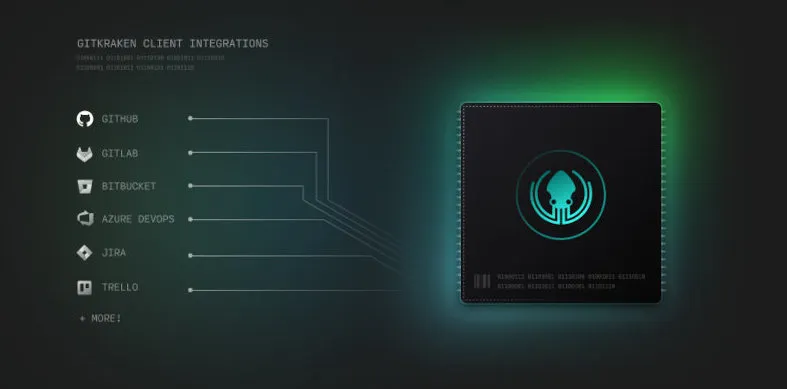
| Integrated Pull Requests | Create, view, and manage pull requests from GitHub, GitLab, Bitbucket, and Azure DevOps directly within GitKraken Desktop (full management on Pro and above; the free Community tier is limited to public repos). | Provides a unified interface to manage your code review workflow across multiple services, saving time and simplifying collaboration. |
| Built-in Merge Conflict Tool | A powerful, user-friendly tool that helps you resolve merge conflicts by showing the conflicting changes side-by-side and allowing you to choose the correct code. | Turns one of the most feared Git operations into a straightforward, guided process, increasing developer confidence. |
The GitKraken Philosophy: Who Is It For?
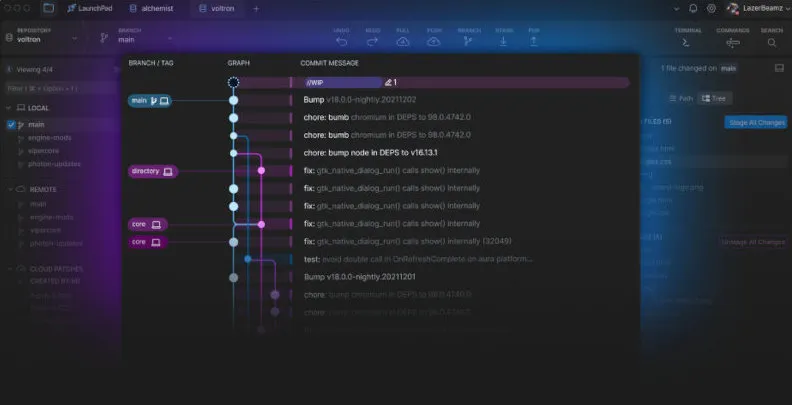
GitKraken’s philosophy is built on visualization, productivity, and accessibility. It aims to tame the complexity of Git, making it approachable for beginners and faster for experts. It argues that a powerful GUI can be a more efficient way to interact with Git than the command line for many tasks.
This makes it an ideal choice for:
Visual Learners: Developers who benefit from seeing their branch structure rather than trying to interpret text-based git log output.
Teams of All Skill Levels: It helps beginners get up to speed quickly while providing power-user features like interactive rebase for seniors.
Developers Working Across Multiple Platforms: The client unifies the experience of working with repositories hosted on GitHub, GitLab, and other services.
Anyone Looking to Be Faster with Git: The combination of the GUI, keyboard shortcuts, and deep integrations is designed to accelerate common development workflows.
If you’ve ever felt that the Git command line is opaque or wished you could just “see” what’s happening in your repository, GitKraken is built for you.
GitHub vs. GitKraken: A Quick Comparison
This comparison is different. It’s not about hosting features but about the primary interaction model for the developer.
| Aspect | GitHub | GitKraken Suite |
|---|---|---|
| Primary Role | A cloud-based code hosting platform with collaboration features. | A developer productivity suite (client/tools) that connects to hosting platforms. |
| Core Interaction | Web UI for collaboration, command line (or other client) for local work. | A desktop GUI and IDE integration for both local work and collaboration. |
| Hosting | Provides remote repository hosting. | Connects to remote repositories on GitHub, GitLab, etc. |
| Target | The entire software development lifecycle (Issues, Actions, Packages, Hosting). | The developer’s direct interaction with the Git repository and pull requests. |
Pros and Cons
Why You Might Choose GitKraken
Unmatched Visualization: The interactive commit graph is best-in-class and makes understanding and manipulating your project’s history incredibly intuitive.
Huge Productivity Gains: Features like the built-in merge tool, drag-and-drop actions, and deep integrations with issue trackers (like Jira) can save a significant amount of time.
Lowers the Learning Curve: It makes Git concepts like branching, merging, and rebasing tangible and less intimidating for newcomers.
Cross-Platform and Cross-Service: It works beautifully on Windows, macOS, and Linux, and provides a consistent experience whether your code is on GitHub, GitLab, or elsewhere.
Potential Drawbacks
It’s Not a Standalone Solution: You still need a hosting provider like GitHub for your remote repositories. It’s an enhancement, not a replacement.
Resource Usage: As a feature-rich Electron application, GitKraken Desktop can be more demanding on system resources (RAM) than the native Git CLI or simpler clients.
Freemium Model, Now with More Tiers: The free Community tier covers the basics, but many of the most powerful productivity features, including full pull request management beyond public repos, are reserved for paid tiers. Pricing has also grown more complex: what used to be a simple free-vs-Pro choice is now five tiers (Community, Pro, Advanced, Business, Enterprise). It’s worth checking the pricing page closely to see which tier actually has the feature you need.
Can Obscure Git Fundamentals: A common critique of any Git GUI is that over-reliance can prevent a developer from learning the underlying commands, which is crucial for troubleshooting or working in a terminal-only environment.
Getting Started & Further Reading
Ready to visualize your workflow and supercharge your productivity? Check out the official resources.
Official Website: https://www.gitkraken.com/
GitKraken Desktop (formerly “GitKraken Client”): https://www.gitkraken.com/git-client
GitLens for VS Code: https://www.gitkraken.com/gitlens
Pricing Page: https://www.gitkraken.com/pricing
Frequently Asked Questions (FAQ)
Q: Does GitKraken replace GitHub?
A: No, GitKraken is not a hosting platform like GitHub. It’s a suite of tools (GUI client and VS Code extension) that enhances your interaction with Git repositories hosted on platforms like GitHub, GitLab, or Bitbucket.
Q: Is GitKraken free to use?
A: GitKraken offers a free Community tier with core features, but advanced features like Jira integration or full pull request management (beyond public repos) require a paid tier. Pricing is now split across five tiers, Community, Pro, Advanced, Business, and Enterprise, rather than a simple free/Pro split. Visit https://www.gitkraken.com/pricing for current details.
Q: Can I use GitKraken with repositories not hosted on GitHub?
A: Yes, GitKraken supports repositories hosted on GitHub, GitLab, Bitbucket, Azure DevOps, and even self-hosted solutions, providing a unified interface for multiple platforms.
Q: Is GitLens included with GitKraken Desktop?
A: GitLens is a separate VS Code extension but is part of the GitKraken suite. The free version of GitLens is robust, with premium features available via a GitKraken Pro subscription.
Q: How does GitKraken handle merge conflicts?
A: GitKraken includes a built-in merge conflict tool that displays conflicting changes side-by-side, allowing you to select the desired changes with a simple interface, making the process intuitive and less error-prone.
Conclusion
GitKraken occupies a unique and valuable place in the developer’s toolkit. It’s not a GitHub alternative in the traditional sense. But it is a powerful alternative to the way most developers interact with GitHub. By providing a stunning visual interface, a powerful set of productivity tools, and the best-in-class GitLens extension, GitKraken makes developers faster, more confident, and more efficient. For many, it’s the missing piece that makes working with Git a pleasure rather than a chore.
What’s changed since this guide first went up is the scope of that mission. GitKraken (now GitKraken Desktop) has grown from “a nicer way to see your commit graph” into a platform for supervising AI coding agents alongside your own work: parallel agent management, AI-assisted conflict resolution, and an MCP server that gives agents real project context. Whether that expansion matters to you depends on how much AI-assisted development is already part of your workflow. But it’s no longer accurate to think of GitKraken as purely a human-facing Git GUI.