
Bitbucket: The Complete Guide to Atlassian's Git Powerhouse
Bitbucket: A Deep Dive into Atlassian’s Git Powerhouse
When you talk about major league players in the Git hosting world, the conversation inevitably includes GitHub, GitLab, and the powerful contender from Atlassian: Bitbucket. Originally known as a primary host for Mercurial repositories, Bitbucket has since evolved into a first-class Git platform designed for professional teams.
Its single greatest strength and defining characteristic is its unparalleled, native integration with the rest of the Atlassian ecosystem, most notably Jira. Bitbucket isn’t just a place to store code. It’s the developer’s hub within a complete software development lifecycle managed by Atlassian’s suite of tools.
What’s New in 2025-2026
Bitbucket saw significant changes in 2025. Here’s a quick summary of what’s changed and what’s been added:
| Change | Impact |
|---|---|
| Rovo Chat in Bitbucket Cloud | AI assistant embedded in the top navigation bar; connects code to Jira, Confluence, and 50+ apps via natural language |
| Rovo Dev (agentic AI) | Automates pipeline steps, fixes failing tests, generates PRs, and reviews code using natural language (primarily on Premium plans) |
| Bitbucket Packages (Container Registry) | Native package storage built into Bitbucket Cloud; now covers five registries: Containers, Maven, npm, PyPI, and NuGet |
| Merge Queues (GA) | Automatically sequences and validates PRs before merging; generally available for Standard and Premium plans |
| Draft Pull Requests | Authors can now mark PRs as drafts to solicit early feedback without triggering a formal review |
| Self-Hosted Runners pricing | Free tier continues (up to 100 runners); new paid Premium Runners tier introduced for advanced orchestration and support |
| Free plan restrictions | 1 GB workspace storage cap, Snippets and Downloads removed, Pipelines logs reduced to 90-day retention (effective April 28, 2025) |
| Pricing updates | Standard now $3.65/user/month; Premium now $7.25/user/month |
| Rovo MCP Server support | AI clients (Claude, ChatGPT, Cursor, VS Code) can browse repos, create commits, and check pipelines via MCP |
| App passwords fully removed | Username/password auth for Bitbucket Cloud is gone. After a June 9-July 27, 2026 brownout period, app passwords stopped working entirely on July 28, 2026. API tokens are now required. |
Table of Contents
- Key Features at a Glance
- The Bitbucket Philosophy: Who Is It For?
- Getting Started with Bitbucket
- Repository Management
- Branching and Workflow Strategies
- Pull Requests and Code Review
- Bitbucket Pipelines: CI/CD Deep Dive
- Jira Integration: The Killer Feature
- Security and Permissions
- Atlassian Ecosystem Integration
- Migration Strategies
- AI Features: Rovo Chat & Rovo Dev
- GitHub vs. Bitbucket: A Quick Comparison
- Enterprise Features and Data Center
- Best Practices and Tips
- Troubleshooting Common Issues
- Pros and Cons
- Pricing and Plans
- Getting Started & Further Reading
- FAQ
- Conclusion
Key Features at a Glance
Bitbucket’s features are designed to create a seamless workflow for teams that plan, build, and deploy software using a structured process.
| Feature | Description | Key Benefit |
|---|---|---|
| World-Class Jira Integration | This is its killer feature. Automatically link commits, branches, and pull requests to Jira issues. Transition tickets through workflows directly from your commit messages. | Creates a single source of truth. Developers stay in their flow, and project managers get full visibility into development progress without ever leaving Jira. |
| Bitbucket Pipelines | A powerful, integrated CI/CD service built directly into Bitbucket. Configure your build, test, and deployment pipeline using a bitbucket-pipelines.yml file in your repo. | Eliminates the need for a separate CI/CD server like Jenkins. CI/CD is managed as code, right alongside the code it’s building and deploying. |
| Code Insights | Allows third-party analysis tools (for security scanning, code quality, test coverage) to surface their reports directly within the pull request view. | “Shifts security and quality left” by providing developers with critical feedback directly in their workflow before code is merged. |
| Flexible Deployment Models | Offered as Bitbucket Cloud (SaaS) and Bitbucket Data Center (a highly available, self-hosted solution for enterprises). | Provides a solution for teams of all sizes, from small startups on the cloud to large enterprises with strict on-premise requirements. |
| Branch Permissions | Granular control over who can push to specific branches, require pull requests, and enforce branch naming patterns. | Ensures code quality and maintains development workflow integrity across large teams. |
| Smart Mirroring | Automatically synchronize repositories across different Bitbucket instances for backup and disaster recovery. | Provides enterprise-grade reliability and geographical distribution of code repositories. |
| Rovo AI Integration | Atlassian’s AI teammate embedded directly into Bitbucket Cloud, offering Rovo Chat for code explanation and context, and Rovo Dev for agentic CI/CD automation. | Reduces context-switching by surfacing Jira tickets, Confluence docs, and pipeline status in one AI-powered conversation inside the repository UI. |
| Bitbucket Packages | A native package registry built into Bitbucket Cloud, covering Containers, Maven, npm, PyPI, and NuGet alongside your source code and CI/CD pipelines. | Eliminates the need for separate package/container registry tools, keeping code, pipelines, and packages under one roof. |
| Merge Queues | Automatically sequences, validates, and merges pull requests against the latest target branch state before applying changes. Generally available for Standard and Premium plans. | Prevents “green-build” breakages in high-velocity repos and monorepos, removing the need for manual rebasing or babysitting merges. |
The Bitbucket Philosophy: Who Is It For?
The philosophy of Bitbucket is deep integration for professional teams. It’s built for organizations that view software development as a structured process, from planning and issue tracking to coding and deployment, and want a single, cohesive toolchain to manage it all.
This makes it the ideal choice for:
Teams Already Using Jira: For the millions of teams that run on Jira, Bitbucket is the most logical choice. The integration is so deep that using them together feels like using one unified product.
Enterprises Standardized on Atlassian: Companies that use Confluence for documentation, Jira for planning, and Bitbucket for code get a seamless, enterprise-supported workflow from a single vendor.
Startups Looking for an Integrated Suite: Small teams can start with the generous free tier and have a complete, integrated project management and development platform from day one.
Developers who value context: The ability to see Jira ticket details, related commits, and build statuses in one place is a massive productivity booster.
Getting Started with Bitbucket
Account Creation and Initial Setup
Setting up your Bitbucket account is straightforward, but making the right choices early can save significant time later.
Step 1: Choose Your Deployment Model
- Bitbucket Cloud: Perfect for most teams, offers immediate access and automatic updates
- Bitbucket Data Center: For enterprises requiring on-premises hosting or specific compliance needs
Step 2: Account Configuration
- Create your Atlassian account at bitbucket.org
- Set up two-factor authentication immediately
- Configure your profile with SSH keys for secure repository access
- Join or create your workspace (team organization)
Step 3: Workspace Setup
- Define naming conventions for repositories
- Set up default branch permissions
- Configure integration settings if you’re already using other Atlassian products
- Invite team members and assign appropriate roles
SSH Key Configuration
Bitbucket supports both SSH and HTTPS for repository access, but SSH is generally preferred for its security and convenience.
# Generate SSH key
ssh-keygen -t rsa -b 4096 -C "your.email@example.com"

# Add to SSH agent
ssh-add ~/.ssh/id_rsa

# Copy public key to clipboard (macOS)
pbcopy < ~/.ssh/id_rsa.pub

# Copy public key to clipboard (Linux)
xclip -sel clip < ~/.ssh/id_rsa.pub
Add the public key to your Bitbucket account under Personal Settings > SSH Keys.
Repository Management
Creating and Organizing Repositories
Effective repository organization is crucial for team productivity and maintainability.
Repository Creation Best Practices:
- Use clear, descriptive names that reflect the project purpose
- Follow consistent naming conventions (e.g.,
project-component-type) - Set appropriate access levels from the start
- Initialize with a comprehensive README.md
- Include appropriate
.gitignorefiles for your technology stack
Repository Structure Recommendations:
project-name/
├── README.md
├── .gitignore
├── bitbucket-pipelines.yml
├── docs/
├── src/
├── tests/
└── deployment/
Access Control and Permissions
Bitbucket provides granular permission controls at multiple levels:
Workspace Level:
- Admins: Full control over the workspace and all repositories
- Members: Can create repositories and access shared resources
- Collaborators: Limited access to specific repositories only
Repository Level:
- Admin: Full repository control including settings and deletion
- Write: Can push code and manage pull requests
- Read: Can clone and view repository contents
Branch Level:
- Enforce pull request requirements
- Restrict who can push directly to specific branches
- Require specific reviewers for sensitive branches
Branching and Workflow Strategies
Git Flow with Bitbucket
Bitbucket works excellently with popular branching strategies. Here’s how to implement Git Flow effectively:
Main Branch Types:
main/master: Production-ready codedevelop: Integration branch for featuresfeature/*: Individual feature developmentrelease/*: Release preparationhotfix/*: Critical production fixes
Branch Protection Rules:
# Example branch permissions configuration
main:
  - require_pull_request: true
  - require_reviews: 2
  - restrict_pushes: true
  - allow_admins_override: false

develop:
  - require_pull_request: true
  - require_reviews: 1
  - restrict_pushes: true
Feature Branch Workflow
For teams preferring simpler workflows, the feature branch strategy works well:
- Create feature branch from
main - Develop and test the feature
- Create pull request for review
- Merge after approval and testing
- Delete feature branch
Naming Conventions:
feature/JIRA-123-user-authentication
bugfix/JIRA-456-login-error
hotfix/critical-security-patch
Pull Requests and Code Review
Creating Effective Pull Requests
Pull requests are the heart of collaborative development in Bitbucket. Here’s how to make them effective:
Pull Request Template:
## Description

Brief description of changes and their purpose.

## Related Jira Issue

- Fixes PROJ-123

## Type of Change

- [ ] Bug fix
- [ ] New feature
- [ ] Breaking change
- [ ] Documentation update

## Testing

- [ ] Unit tests pass
- [ ] Integration tests pass
- [ ] Manual testing completed

## Checklist

- [ ] Code follows style guidelines
- [ ] Self-review completed
- [ ] Comments added for complex logic
- [ ] Documentation updated
Advanced Review Features
Inline Comments and Suggestions:
- Add contextual feedback directly on code lines
- Use suggestion feature for minor corrections
- Reference related issues and documentation
Review Requirements:
- Code Owners & Default Reviewers: Automatically assign the right team members to review specific parts of the codebase based on file paths.
- Set minimum number of required approvers
- Require specific team members for sensitive areas
- Block merge until all conversations are resolved
Automated Checks:
- Code quality gates via Code Insights
- Automated testing via Pipelines
- Security scanning integration
Bitbucket Pipelines: CI/CD Deep Dive
Pipeline Configuration Basics
Bitbucket Pipelines is defined using a YAML file in your repository root:
# bitbucket-pipelines.yml
image: node:22

pipelines:
  default:
    - step:
        name: Build and Test
        caches:
          - node
        script:
          - npm install
          - npm run test
          - npm run build
        artifacts:
          - dist/**

  branches:
    main:
      - step:
          name: Build and Test
          caches:
            - node
          script:
            - npm install
            - npm run test
            - npm run build
          artifacts:
            - dist/**
      - step:
          name: Deploy to Production
          deployment: production
          script:
            - echo "Deploying to production..."
            -  # Your deployment commands here
Bitbucket Pipes: Reusable CI/CD Steps
While GitHub has Actions, Bitbucket has Pipes. Pipes are pre-configured, reusable snippets of code that make it easy to build complex pipelines without writing custom scripts.
Instead of writing a complex bash script to deploy to AWS or send a Slack notification, you can simply call a pipe in your YAML file:
- step:
    name: Deploy to AWS
    script:
      - pipe: atlassian/aws-elasticbeanstalk-deploy:1.0.2
        variables:
          AWS_ACCESS_KEY_ID: $AWS_ACCESS_KEY_ID
          AWS_SECRET_ACCESS_KEY: $AWS_SECRET_ACCESS_KEY
          AWS_DEFAULT_REGION: "us-east-1"
          APPLICATION_NAME: "my-app"
          ENVIRONMENT_NAME: "my-env"
          ZIP_FILE: "application.zip"
Advanced Pipeline Patterns
Multi-Stage Pipeline:
pipelines:
  branches:
    main:
      - parallel:
          - step:
              name: Unit Tests
              script:
                - npm run test:unit
          - step:
              name: Lint Code
              script:
                - npm run lint
      - step:
          name: Integration Tests
          script:
            - npm run test:integration
      - step:
          name: Build Production
          script:
            - npm run build:prod
          artifacts:
            - build/**
      - step:
          name: Deploy
          deployment: production
          script:
            - ./deploy.sh
Docker-Based Pipeline:
image: atlassian/default-image:3

pipelines:
  default:
    - step:
        name: Build Docker Image
        services:
          - docker
        script:
          - docker build -t myapp:$BITBUCKET_COMMIT .
          - docker tag myapp:$BITBUCKET_COMMIT myapp:latest
          - docker push myregistry.com/myapp:$BITBUCKET_COMMIT
Pipeline Security and Best Practices
Secure Environment Variables:
- Use Bitbucket’s encrypted environment variables
- Never commit secrets to your repository
- Use deployment-specific variables for different environments
Caching Strategy:
definitions:
  caches:
    npm-cache: ~/.npm
    composer: ~/.composer/cache

pipelines:
  default:
    - step:
        caches:
          - npm-cache
        script:
          - npm ci
Jira Integration: The Killer Feature
Setting Up Jira Integration
The Jira-Bitbucket integration transforms how development teams work by connecting code changes directly to project management.
Initial Setup:
- Link your Jira and Bitbucket instances
- Configure project associations
- Set up smart commit syntax
- Enable development panel in Jira
Smart Commits
Smart commits allow developers to perform Jira actions directly from commit messages:
# Transition issue and add work log
git commit -m "PROJ-123 #time 2h #transition In Progress Fixed login bug"

# Comment on issue
git commit -m "PROJ-456 #comment Updated error handling logic"

# Close issue
git commit -m "PROJ-789 #close Implemented user registration feature"
Smart Commit Syntax:
#time <value>- Log work time#comment <message>- Add comment to issue#transition <status>- Transition issue status#close- Close the issue
Development Panel Integration
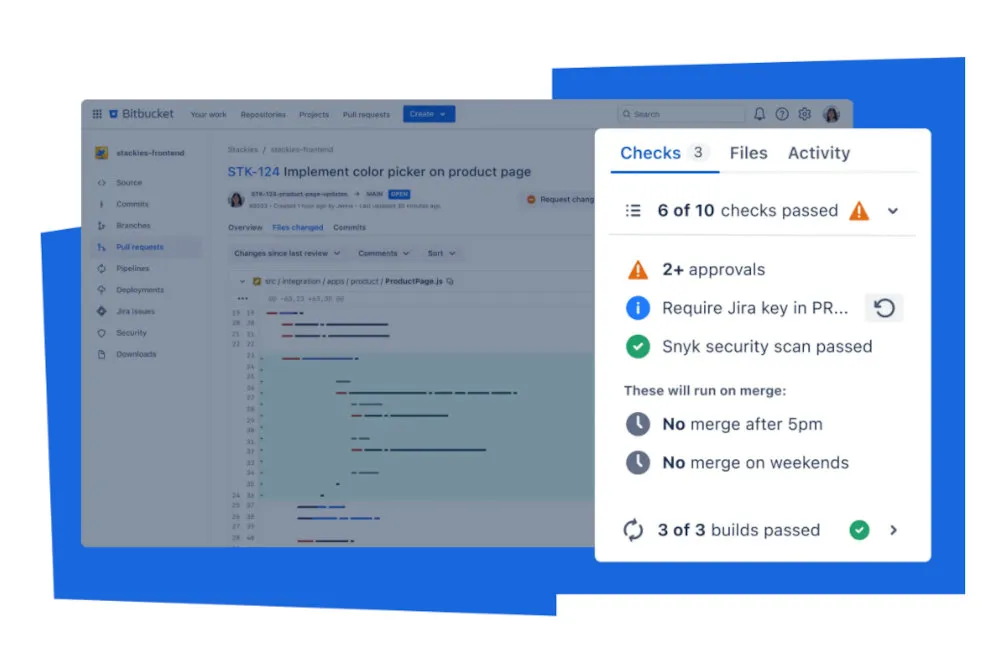
When properly configured, Jira issues display a development panel showing:
- Related commits with full messages
- Build status from Bitbucket Pipelines
- Pull request status and reviewers
- Deployment information
This creates a complete audit trail from planning to deployment.
Security and Permissions
Repository Security Best Practices
Access Control Strategy:
# Repository permission matrix
Sensitive Repos (main, config):
  - Admin: Tech leads only
  - Write: Senior developers
  - Read: All team members

Feature Repos:
  - Admin: Project owners
  - Write: Feature team members
  - Read: Stakeholders
Branch Protection:
- Require pull requests for protected branches
- Enforce review requirements
- Block force pushes
- Require up-to-date branches before merge
Two-Factor Authentication
Enable 2FA for all team members:
- Navigate to Personal Settings > Account Settings
- Enable two-factor authentication
- Use authenticator app (recommended) or SMS
- Save backup codes securely
IP Allowlisting
For enterprise security, configure IP allowlisting:
- Define allowed IP ranges in workspace settings
- Apply to specific repositories or entire workspace
- Consider VPN access for remote team members
Atlassian Ecosystem Integration
Confluence Integration
Connect Bitbucket with Confluence for comprehensive documentation:
- Embed repository information in Confluence pages
- Link code examples directly to source files
- Automatically update documentation with code changes
Confluence Macro Examples:
{bitbucket-repo}
workspace=mycompany
repo=my-project
{bitbucket-repo}

{bitbucket-file}
workspace=mycompany
repo=my-project
file=src/main/java/Example.java
{bitbucket-file}
Trello Integration
For teams using Trello for project management:
- Link Bitbucket commits to Trello cards
- Automatically update card status based on commits
- Display development progress on Trello boards
Opsgenie Integration
Integrate with Opsgenie for incident management:
- Automatically create incidents from failed deployments
- Link code changes to incident resolution
- Track deployment-related incidents
Migration Strategies
Migrating from GitHub
Pre-Migration Checklist:
- Audit existing repositories and their dependencies
- Document current CI/CD processes
- Identify integrations that need reconfiguration
- Plan team training and transition timeline
Migration Tools:
# Using Bitbucket's import feature
1. Navigate to Repository > Import repository
2. Select GitHub as source
3. Provide GitHub credentials and repository URL
4. Configure new repository settings

# Manual migration with full history
git clone --bare https://github.com/username/repo.git
cd repo.git
git push --mirror https://bitbucket.org/username/repo.git
Post-Migration Steps:
- Update CI/CD pipeline configurations
- Reconfigure webhooks and integrations
- Update documentation and README files
- Train team on Bitbucket-specific features
Migrating from Other Platforms
From GitLab:
- Export GitLab projects using their export feature
- Use Bitbucket’s import functionality
- Manually recreate CI/CD pipelines using Pipelines syntax
From Azure DevOps:
- Use Git’s remote functionality to push to Bitbucket
- Recreate work item links using Jira integration
- Configure new build pipelines
AI Features: Rovo Chat & Rovo Dev
In 2025, Atlassian made AI a core, built-in part of the Bitbucket experience through two flagship products: Rovo Chat and Rovo Dev. These are available to Bitbucket Cloud users and represent one of the platform’s most significant evolutions in recent years.
Rovo Chat in Bitbucket
Rovo Chat is Atlassian’s AI-powered assistant, now embedded directly in Bitbucket Cloud’s navigation bar. Powered by the Atlassian Teamwork Graph, it connects your code to information across Jira, Confluence, Figma, Sentry, Dropbox, and 50+ other apps.
What Rovo Chat can do in Bitbucket:
- Explain unfamiliar code and onboard you to new repositories faster
- Answer questions about related Jira tickets, Confluence documentation, or design files, without leaving the code view
- Summarize pull request changes and identify key concerns
- Provide AI-driven search across all connected Atlassian apps using natural language
Rovo Chat began rolling out in September 2025 and reached all Bitbucket Cloud users by the end of that month.
Rovo Dev: Agentic AI for Developers
Rovo Dev is a context-aware AI agent announced at Team 2025 in Barcelona. It goes well beyond chat, taking autonomous action across your development workflow:
- In Bitbucket Pipelines: Use natural language to define pipeline steps and create automations, such as fixing flaky tests, reviewing PRs, summarizing build failures, and more.
- AI-powered test management: When a pipeline test fails, Rovo Dev can triage the failure, attempt a fix, generate a pull request, and re-execute the merge automatically.
- Code review acceleration: Rovo Dev can suggest improvements based on your organization’s code policies and help eliminate context switching during reviews.
- Vulnerability remediation: Rovo Dev can automatically find and fix code vulnerabilities without manual intervention.
Rovo MCP Server Support
As of 2026, Bitbucket Cloud is supported on the Atlassian Rovo MCP Server. This means external AI clients, including Claude, ChatGPT, Cursor, and VS Code, can interact with Bitbucket repositories directly. They can browse code, create commits, open pull requests, and check pipeline results through a secure MCP connection.
AI in the Comparison Table
When evaluating Bitbucket against GitHub and GitLab, AI capabilities are now a first-class differentiator:
| Platform | AI Offering |
|---|---|
| Bitbucket | Rovo Chat (context-aware assistant), Rovo Dev (agentic automation), MCP support |
| GitHub | GitHub Copilot (code completion), Copilot for PRs |
| GitLab | GitLab Duo (code suggestions, vulnerability explanation) |
GitHub vs. Bitbucket: A Quick Comparison
While both are top-tier Git platforms, their core focus and ecosystem philosophy are different.
| Aspect | GitHub | Bitbucket |
|---|---|---|
| Primary Focus | Community, Open Source, and Developer Experience | Professional Teams, Enterprise, and Jira Integration |
| Project Management | Integrated GitHub Issues and Projects. | World-class, native integration with Jira Software. |
| Ecosystem | A vast, open ecosystem built around the GitHub Marketplace and developer community. | A tightly integrated, curated ecosystem of Atlassian products (Jira, Confluence, Trello, etc.). |
| CI/CD | GitHub Actions (extremely powerful and extensible). | Bitbucket Pipelines (mature and deeply integrated). |
| Community Features | Issues, Discussions, GitHub Pages, extensive marketplace | Focus on team collaboration over public community |
| Enterprise Features | GitHub Enterprise Server/Cloud with SAML, LDAP | Data Center deployment with enterprise-grade security |
| Pricing Model | Per-user pricing with generous free tier | Per-user pricing, excellent small team free tier |
Enterprise Features and Data Center
Bitbucket Data Center Overview
Note: Atlassian officially ended support for “Bitbucket Server” in early 2024. Today, enterprise customers seeking self-managed environments must use Bitbucket Data Center.
Bitbucket Data Center is designed for organizations requiring:
- High availability and disaster recovery
- Performance at scale (thousands of users)
- Advanced security and compliance features
- On-premises or private cloud deployment
Key Features:
- Active-active clustering for zero-downtime deployments
- Smart mirroring for geographic distribution
- Rate limiting and performance monitoring
- Advanced audit logging and compliance reporting
High Availability Setup
Cluster Configuration:
# Example cluster setup
Load Balancer:
  - Route traffic across application nodes
  - Health check configuration
  - SSL termination

Application Nodes:
  - Multiple Bitbucket instances
  - Shared file system for repositories
  - Session replication

Database:
  - PostgreSQL or Oracle with clustering
  - Regular backups and point-in-time recovery
  - Read replicas for improved performance
Compliance and Auditing
Audit Logging:
- Track all user actions and system events
- Export logs to SIEM systems
- Compliance reporting for SOX, GDPR, HIPAA
Data Residency:
- Control where data is stored geographically
- Meet local data protection requirements
- Implement data retention policies
Best Practices and Tips
Repository Management Best Practices
Naming Conventions:
// Good examples
user-authentication-service
mobile-app-ios
data-processing-pipeline
infrastructure-terraform

// Poor examples
myproject
stuff
temp-repo
john-test
README Standards:
Every repository should include:
- Clear project description and purpose
- Installation and setup instructions
- Usage examples and API documentation
- Contributing guidelines
- License information
- Contact information for maintainers
Commit Message Guidelines
Conventional Commits Format:
<type>[optional scope]: <description>

[optional body]

[optional footer(s)]
Examples:
feat(auth): add OAuth2 integration
fix(api): resolve null pointer exception in user service
docs: update API documentation for v2.0
ci: add automated security scanning to pipeline
Code Review Best Practices
For Authors:
- Keep pull requests small and focused
- Write clear, descriptive titles and descriptions
- Include tests for new functionality
- Respond promptly to reviewer feedback
For Reviewers:
- Review promptly (within 24 hours)
- Be constructive and specific in feedback
- Focus on code quality, not personal style preferences
- Use suggestions for minor changes
Pipeline Optimization
Performance Tips:
# Use caches effectively
definitions:
  caches:
    npm: ~/.npm
    maven: ~/.m2/repository
    gradle: ~/.gradle

# Parallel execution for independent tasks
- parallel:
    - step:
        name: Unit Tests
        script: npm run test:unit
    - step:
        name: Lint
        script: npm run lint
    - step:
        name: Type Check
        script: npm run type-check
Resource Management:
- Use appropriate build minutes allocation
- Optimize Docker images for faster builds
- Implement smart caching strategies
- Monitor pipeline performance metrics
Troubleshooting Common Issues
Git and Repository Issues
Large File Handling:
# Use Git LFS for large files
git lfs track "*.psd"
git lfs track "*.zip"
git add .gitattributes
git commit -m "Add Git LFS tracking"
Repository Size Optimization:
# Remove large files from history
git filter-branch --force --index-filter \
  'git rm --cached --ignore-unmatch path/to/large/file' \
  --prune-empty --tag-name-filter cat -- --all

# Clean up and force push
git reflog expire --expire=now --all
git gc --prune=now --aggressive
git push --force-with-lease --all
Pipeline Troubleshooting
Common Pipeline Errors:
Build Memory Issues:
# Increase memory allocation
step:
  name: Build
  size: 2x # Use larger build environment
  script:
    - export NODE_OPTIONS="--max-old-space-size=4096"
    - npm run build
Cache Problems:
# Clear cache when needed
step:
  name: Build
  script:
    - npm ci --cache-clean
    - npm run build
Timeout Issues:
# Increase timeout for long-running processes
step:
  name: Integration Tests
  max-time: 20 # minutes
  script:
    - npm run test:integration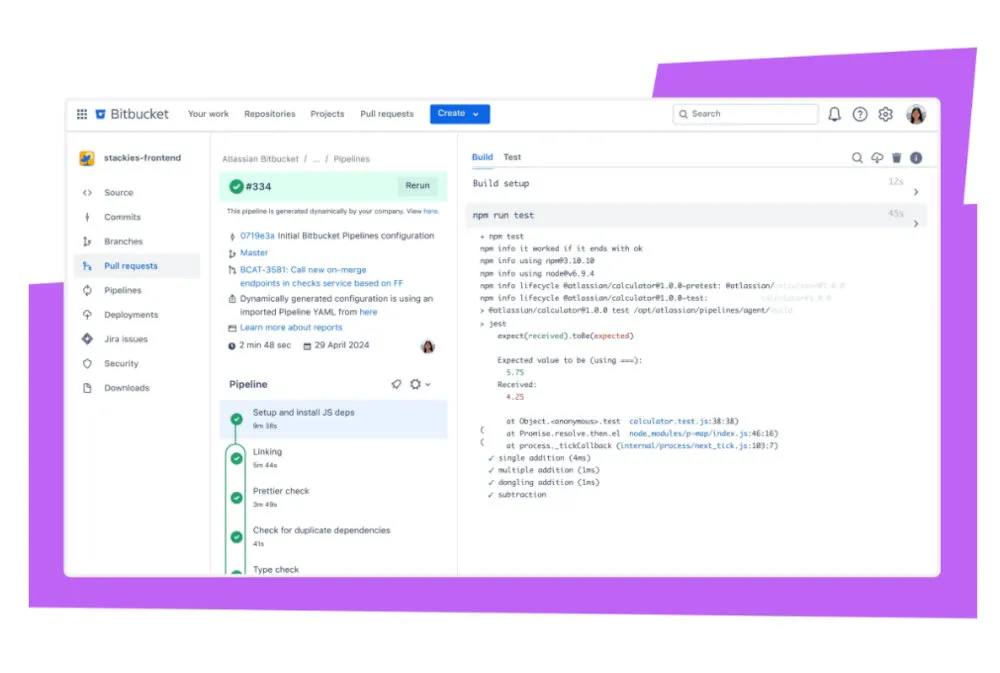
Permission and Access Issues
SSH Key Problems:
# Test SSH connection
ssh -T git@bitbucket.org

# Debug SSH issues
ssh -vT git@bitbucket.org

# Check SSH agent
ssh-add -l
Permission Denied Solutions:
- Verify SSH key is added to Bitbucket account
- Check repository access permissions
- Ensure SSH agent is running and key is loaded
- Verify workspace membership
Pros and Cons
Why You Might Choose Bitbucket
Unbeatable Jira Integration: This cannot be overstated. It is the single biggest reason to choose Bitbucket and it transforms the development workflow.
Part of a Mature Ecosystem: The ability to connect seamlessly with Confluence, Opsgenie, Trello, and other Atlassian tools creates a powerful, unified command center.
Integrated AI Capabilities: Rovo Chat and Rovo Dev are now built into the platform. They give teams AI-powered code explanation, PR review assistance, agentic pipeline automation, and cross-tool context, without needing a third-party AI tool.
Free Tier for Small Teams: The free plan still supports up to 5 users with unlimited private repositories, though the 2025 restrictions (1 GB storage cap, no Snippets/Downloads) have reduced its generosity compared to previous years.
Competitive Pricing: For growing teams, its per-user pricing is often very competitive compared to other solutions.
Enterprise-Grade Security: Advanced security features and compliance capabilities for regulated industries.
Built-in CI/CD: Bitbucket Pipelines eliminates the need for separate CI/CD tools.
Potential Drawbacks
Less Community and Open-Source Focus: Bitbucket is not the heart of the open-source world. Its UI and feature set feel more tailored to corporate teams than public collaboration.
Free Plan Significantly Restricted (2025): The 2025 free plan changes, including the 1 GB workspace storage cap, removal of Snippets and Downloads, and 90-day Pipelines log retention, have pushed many solo developers and small teams to reconsider Bitbucket or upgrade to a paid plan.
UI Can Feel Dense: The interface is powerful but can be perceived as more cluttered or complex than GitHub’s cleaner, more streamlined design.
The “Atlassian Lock-in”: The tight integration is a double-edged sword. The more you rely on the seamless connections between Atlassian products, the more difficult it becomes to migrate away from any one of them.
Pipelines vs. Actions: While Bitbucket Pipelines is very capable, GitHub Actions has a significantly larger community-driven marketplace of pre-built actions, giving it an edge in flexibility and extensibility.
Limited Third-Party Marketplace: Fewer integrations and add-ons compared to GitHub’s extensive marketplace.
Learning Curve: Teams new to Atlassian products may face a steeper learning curve.
Pricing and Plans
Bitbucket Cloud Pricing (Updated 2025)
Note: Bitbucket updated its pricing in 2025. The figures below reflect current published rates. Always verify on the official pricing page before committing.
Free Plan:
- Up to 5 users
- Unlimited private repositories
- 50 build minutes per month (shared across workspace)
- 1 GB total workspace storage limit (enforced from April 28, 2025)
- Pipelines logs retained for 90 days only
- Snippets and Downloads features removed
- Inactive repositories (>3 months) may be archived
- Community support
⚠️ Important (2025): The Free plan received significant restrictions effective May 29, 2025. Snippets and file Downloads are no longer available, workspace storage is capped at 1 GB across all repositories, and Pipelines log retention was reduced to 90 days. Workspaces exceeding the storage limit are placed in read-only mode until usage is reduced or the plan is upgraded.
Standard Plan: $3.65 per user/month
- Unlimited users
- 2,500 build minutes per month
- Premium support
- Advanced branch permissions
- Merge checks
- Merge Queues (generally available)
- Pipelines Tests feature (open beta)
Premium Plan: $7.25 per user/month
- Everything in Standard
- 3,500 build minutes per month
- Code insights
- IP allowlisting
- Required two-step verification
- Path-based permissions
- AI-powered capabilities (Rovo Chat, Rovo Dev access)
- 99.9% uptime SLA
- Deployment permissions
- Enforced merge checks
Bitbucket Data Center Pricing
Data Center pricing is quote-based and depends on:
- Number of users (starting at 500 users)
- Support level (Standard or Premium)
- Additional services and professional services
Typical Enterprise Features:
- High availability clustering
- Smart mirroring
- Advanced security and compliance
- 24/7 premium support
- Service Level Agreements (SLAs)
Getting Started & Further Reading
Ready to see how Bitbucket can supercharge your Jira workflow? Explore the official resources.
Official Website: https://bitbucket.org/
Pricing Page: https://bitbucket.org/product/pricing
Documentation: https://support.atlassian.com/bitbucket-cloud/
Atlassian Community (for Bitbucket): https://community.atlassian.com/t5/Bitbucket/ct-p/bitbucket
Pipelines Documentation: https://support.atlassian.com/bitbucket-cloud/docs/build-test-and-deploy-with-pipelines/
API Reference: https://developer.atlassian.com/bitbucket/api/2/reference/
Recommended Learning Path
Week 1: Basics
- Set up account and configure SSH keys
- Create first repository and invite team members
- Practice basic Git operations through Bitbucket interface
Week 2: Collaboration
- Create and review pull requests
- Set up branch permissions
- Configure repository settings and access controls
Week 3: Automation
- Create first Bitbucket Pipeline
- Set up automated testing
- Configure deployment pipeline
Week 4: Integration
- Connect with Jira (if applicable)
- Explore other Atlassian tool integrations
- Implement advanced workflow patterns
FAQ
Q: How does Bitbucket’s Jira integration work in practice?
A: Bitbucket allows you to link commits, branches, and pull requests to Jira issues using specific syntax in commit messages (e.g., including the Jira issue key). This automatically updates the Jira ticket with commit details, build statuses, and allows transitioning issues (e.g., from “In Progress” to “Done”) directly from Bitbucket.
Q: Can I use Bitbucket without Jira?
A: Yes, Bitbucket can be used as a standalone Git platform, but its true power shines when integrated with Jira. Without Jira, you may miss out on the seamless workflow that makes Bitbucket stand out.
Q: Is Bitbucket suitable for open-source projects?
A: While Bitbucket supports public repositories, it’s less focused on open-source communities compared to GitHub. It’s better suited for private, team-oriented projects, especially within the Atlassian ecosystem.
Q: How does Bitbucket Pipelines compare to other CI/CD tools?
A: Bitbucket Pipelines is deeply integrated with Bitbucket, making it easy to set up CI/CD directly in your repository. While it’s robust, it may lack the extensive marketplace of pre-built actions available in GitHub Actions, but it’s simpler for teams already using Bitbucket.
Q: What are the main differences between Bitbucket Cloud and Data Center?
A: Bitbucket Cloud is a fully managed SaaS solution, ideal for small to medium teams. Bitbucket Data Center is a self-hosted, enterprise-grade solution with high availability, performance, and compliance features for large organizations.
Q: Can I migrate from GitHub to Bitbucket without losing history?
A: Yes, Bitbucket provides import tools that preserve full Git history, branches, and tags. However, you’ll need to manually recreate CI/CD pipelines, webhooks, and other platform-specific configurations.
Q: How secure is Bitbucket for enterprise use?
A: Bitbucket offers enterprise-grade security features including two-factor authentication, IP allowlisting, audit logging, SOC 2 Type II compliance, and various data residency options. Data Center deployments provide additional security controls.
Q: What are the limitations of Bitbucket’s free plan?
A: As of April 28, 2025, the free plan’s restrictions became significantly tighter. It still supports up to 5 users with 50 build minutes per month, but now also enforces a 1 GB total workspace storage limit across all repositories. Snippets and Downloads features are no longer available on the free tier. Pipelines logs are retained for only 90 days, and repositories inactive for more than 3 months may be archived. Workspaces exceeding the storage limit are placed in read-only mode. For teams bumping against these limits, upgrading to the Standard plan is the recommended path.
Q: What AI features does Bitbucket offer?
A: In 2025, Atlassian rolled out Rovo Chat and Rovo Dev as core parts of Bitbucket Cloud. Rovo Chat is an in-product AI assistant that can explain code, answer questions about related Jira or Confluence content, and help onboard developers to new repositories. Rovo Dev is a more powerful agentic AI that can autonomously fix failing tests, generate pull requests, review PRs based on your organisation’s policies, and automate Pipelines steps using natural language. Rovo Dev is primarily available on Premium plans.
Q: How does Bitbucket handle large repositories?
A: Bitbucket supports Git LFS (Large File Storage) for handling large files efficiently. For very large repositories, consider using Git LFS for binary assets and implementing repository archiving strategies for historical data.
Q: Can I use custom domains with Bitbucket?
A: Bitbucket Cloud doesn’t natively support custom domains for repository URLs or static site hosting (the old “Bitbucket Pages” feature was deprecated). However, you can easily use Bitbucket Pipelines to automatically build and deploy static sites to external hosts like AWS S3, Netlify, or Vercel, which support custom domains. Data Center deployments can naturally be hosted on your own corporate domain.
Conclusion
Bitbucket is far more than just a GitHub alternative. It is the definitive code collaboration platform for teams built on the Atlassian stack. It offers a comprehensive solution that spans from code hosting to CI/CD and project management integration.
Its deep integration with Jira creates unparalleled visibility and traceability from planning to deployment. This makes it an invaluable tool for professional development teams. The built-in CI/CD capabilities through Pipelines, combined with enterprise-grade security features and flexible deployment options, position Bitbucket as a complete DevOps platform rather than just a code repository.
2025 marked a pivotal year for the platform. Atlassian shipped transformative AI capabilities, Rovo Chat and Rovo Dev, making Bitbucket one of the first Git platforms to offer truly agentic developer workflows. These range from natural language pipeline automation to autonomous test fixing and PR generation. The addition of Bitbucket Packages (a native container registry), Merge Queues, and Draft Pull Requests also addressed long-standing gaps relative to GitHub. At the same time, the tightening of the free plan’s limits (1 GB storage cap, removal of Snippets and Downloads) signals Atlassian’s shift toward monetizing at the lower end of the market.
For teams already invested in the Atlassian ecosystem, Bitbucket isn’t just another alternative. It’s the natural evolution of their development workflow. For teams considering their options, Bitbucket makes a compelling case: the deepest integration between planning, coding, and deployment, now enhanced with AI that understands your full Atlassian context, creates the most efficient development process.
Whether you’re a startup looking for an integrated development platform, an enterprise requiring advanced security and compliance features, or a team seeking to streamline their development workflow, Bitbucket provides the tools and integrations necessary to support modern software development practices.
The choice between Git hosting platforms ultimately depends on your team’s needs, existing tool stack, and workflow preferences. For teams prioritizing integration, professional workflows, comprehensive project visibility, and AI-native development, Bitbucket stands as a compelling choice that continues to evolve rapidly.